

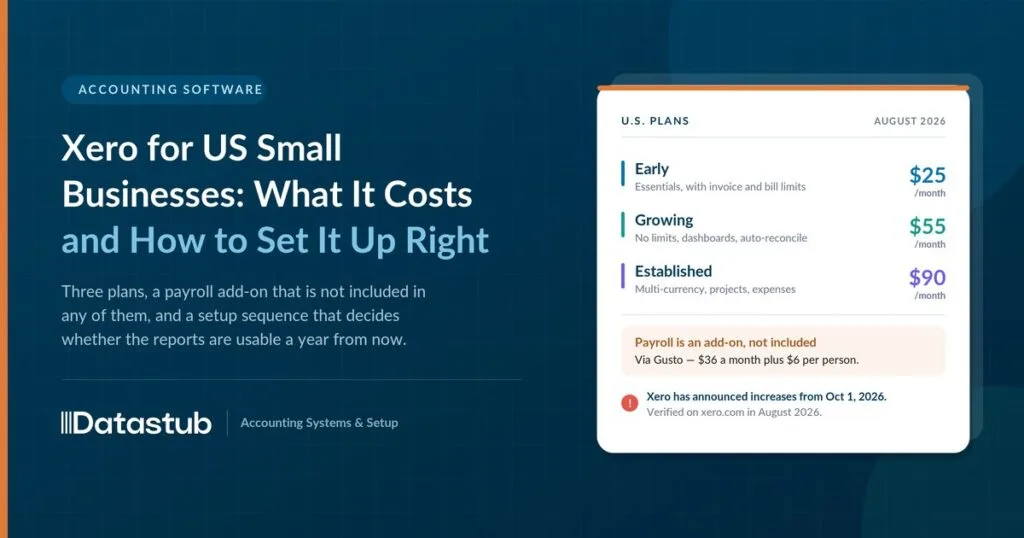
$25 a month. That is Xero’s entry plan in the US today.
On October 1, 2026 it became $27. The number that matters more sits just before it. The current new-customer offer takes 90% off your first six months. It closes on September 30, one day before the increase.
So there is a real window here. But price is the easy part of this decision.
The harder part is the gap between having the software and having usable books. That gap is where most US small businesses lose weeks. Not because Xero is hard to use. Because nobody tells you which parts matter for a US business. Which plan covers sales tax. Whether payroll is included. What happens to your bank feed if you bank with a local credit union instead of Chase.
Here is what Xero includes for a US business, what it costs, and the order to set it up in.
What Xero Is, and Who It Is Built For
Xero is cloud-based accounting software. Everything lives online instead of on one computer, so you, your bookkeeper, and your accountant can all see the same numbers at the same time, from anywhere.
It handles the core of small business bookkeeping: sending invoices, paying bills, connecting to your bank, matching transactions, and producing reports that show whether the business is actually making money.
It is built for small and mid-sized businesses rather than large corporations. Every plan includes unlimited users at no extra charge. That matters if you want your bookkeeper, your business partner, and your CPA all in the same file without paying per seat.
What a US Business Specifically Gets From Xero
Xero started in New Zealand and serves businesses worldwide. The US version is built around the paperwork a US business actually deals with: sales tax across thousands of local jurisdictions, contractor 1099s, and US-style payroll.
Sales Tax Calculated Across 13,000 US Jurisdictions
Xero’s sales tax feature runs on Avalara, a tax compliance engine covering more than 13,000 US jurisdictions. When you create an invoice, it works out the correct rate from your business address, your customer’s location, and what you are selling.
That saves you looking up whether a service is taxable in one state and exempt in the next. It is a real problem too. Product taxability varies by state in ways that rarely follow common sense.
Take an online candle shop in Ohio shipping to customers in twelve states. Rather than tracking twelve sets of rates by hand, Xero calculates the tax on each invoice based on where the order is going.
One limit worth knowing up front: Xero calculates and reports sales tax. It does not file your returns. More on that in the questions below.
W-9 and 1099 Tracking Built Into Every Plan
If you pay independent contractors, Xero collects W-9 forms and tracks what you have paid each contractor toward the 1099 reporting threshold. At year-end the information is already organized instead of scattered across a spreadsheet.
Worth pairing with a real classification check, though. The software tracks what you paid; it does not tell you whether that person should have been a contractor or an employee.
Payroll Runs Through Gusto and Is Billed Separately
Payroll is not bundled into the base subscription. It runs through Gusto, which connects directly to Xero. Gusto calculates and files payroll taxes, pays your team by direct deposit, and keeps up with state payroll rules.
Pricing is public: $36 a month plus $6 per employee or contractor paid. So a five-person team costs $66 a month on top of your Xero plan. If you are new to it, our Gusto payroll setup guide walks through the configuration.
Bank Feeds Now Run Through Plaid
Xero connects to US bank accounts through Plaid. The two announced a partnership in July 2025 that gives Xero more than a thousand direct connections, with the stated aim of tripling the number of high-quality US bank feeds. Rollout began in late 2025.
The point of it is reach. It targets smaller banks and credit unions, not just the handful of national banks every platform supports by default. A business banking locally is less likely to be stuck uploading statements by hand.
What Is Built for a US Business, at a Glance
| Need | How Xero handles it | Powered by |
|---|---|---|
| Sales tax across states | Calculates rates by location and product | Avalara |
| Contractor payments | Collects W-9s, tracks 1099 thresholds | Built into Xero |
| Payroll | Runs payroll, files payroll taxes, direct deposit | Gusto (add-on) |
| Bank connections | Links to US banks and credit unions | Plaid |
Sales tax and 1099 tracking come with every plan. Payroll is the one piece you add on top.
What Xero Costs in the US Right Now
Xero runs three US plans. Every plan includes unlimited users, sales tax, and W-9/1099 management. The difference between tiers is mostly volume and reporting depth.
| Plan | Now | From Oct 1, 2026 | Best for |
|---|---|---|---|
|
Early |
$25/mo |
$27/mo |
Low volume — 20 invoices and 5 bills a month |
|
Growing |
$55/mo |
$59/mo |
Unlimited invoices and bills, automated reconciliation |
|
Established |
$90/mo |
$97/mo |
Multi-currency, project tracking, expense claims, deeper analytics |
Payroll through Gusto is $36 a month plus $6 per person, on top of any plan.
The September 30 Deadline That Matters More Than the Increase
Two dates sit next to each other, and only one of them gets talked about.
Xero’s published price increase takes effect October 1, 2026. Early goes to $27, Growing to $59, Established to $97. That is a $2 to $7 monthly change — real, but small.
The current new-customer offer is the bigger number. It takes 90% off your first six months if you buy by September 30, 2026. That puts Early at $2.50, Growing at $5.50, and Established at $9 a month for half a year, plus a free month during setup.
So the offer closes the day before the price rises. If you were going to sign up this quarter anyway, the sequencing is worth noticing. Confirm the current offer on Xero’s pricing page before you commit, since promotions change without much notice.
What to Gather Before You Open Xero
Setup goes faster, and stays accurate, when you have these ready first.
- Your business’s legal name, address, and entity type — sole proprietor, LLC, S-corp, and so on
- Your EIN if you have one. Not required to sign up, but you need it to run payroll or connect certain business bank accounts
- Bank account details for the account you will connect
- A list of states where you have sales tax obligations, if you sell taxable goods or services
- W-9 forms for any contractors you already pay
- Prior accounting records or a backup export, if you are moving from another platform
The Setup Order That Keeps Your Books Clean
Each step is quick on its own. The order is what stops you re-categorizing months of transactions later.
1. Create Your Organization With the Correct Legal Details
Enter your legal business name, address, industry, and fiscal year. Every invoice, report, and filing pulls its identity from this, so get it right the first time.
2. Connect Your Business Bank Account First
Link your account through Xero’s Plaid-powered connection. This starts the transaction feed immediately, which is what step 8 depends on.
3. Turn On Sales Tax Before You Send Any Invoice
If you sell taxable goods or services, set up sales tax now. Retrofitting tax settings after transactions exist means correcting each one by hand. Turning it on first means every invoice is right from day one.
Sellers crossing state lines should confirm where they actually have an obligation before configuring this. Economic nexus rules decide which states you owe, and the software cannot work that out for you.
4. Review the Chart of Accounts Before Transactions Flow In
This is the list of categories every dollar gets sorted into: income, expenses, assets, liabilities, and equity. Xero’s default template is a reasonable start, but it rarely fits a specific business.
Take a general contractor on the default template. Materials and subcontractor labor land in one generic expense category. Splitting them into two accounts before the first bill is entered is what makes job-cost reports mean anything by month one.
5. Set Up Invoicing and Default Payment Terms
Build your invoice template, set default payment terms, and turn on online payments if you want to get paid faster. Configure invoice numbering here too, so it runs automatically.
6. Add Payroll Before Your First Pay Run
Connect Gusto if you are running payroll. Do it before the first pay run, not after. Correcting a payroll tax filing later is far more work than setting it up right. If you have staff in more than one state, check your multi-state payroll obligations at the same time.
7. Add Users and Set Their Permission Levels
Add your bookkeeper, business partner, or accountant with the right access. Xero does not charge per user, so there is no reason to share one login.
8. Run Your First Bank Reconciliation as the Proof
Match your Xero balance against your actual bank balance. This is the real test that the setup worked. If the numbers agree, everything upstream was done correctly. The mechanics are the same idea as a bank reconciliation in QuickBooks if that is what you are used to.
Which Xero Plan Actually Fits Your Business
Invoice and bill limits push most businesses to upgrade, not missing features.
| Business type | Likely fit | Why |
|---|---|---|
| Freelancer or side business |
Early |
Low invoice volume, simple needs |
| Service business or small retail shop |
Growing |
Needs unlimited invoicing and automated reconciliation |
| Multi-state e-commerce, or projects to track |
Established |
Needs multi-currency, project costing, or deeper reporting |
A one-person bookkeeping practice sending eight invoices a month sits comfortably on Early. A three-person landscaping company sending forty invoices and running payroll for two crews outgrows Early inside the first billing cycle.
Watch that 20-invoice cap. It counts approving as well as sending, which surprises people.
Common Questions About Using Xero in the US
Do I Need an EIN to Sign Up for Xero?
No. You can create an account with just your business and contact details. You will need an EIN once you want to run payroll, open certain business bank accounts, or file as anything other than a sole proprietor.
Does Xero File My Sales Tax Return for Me?
No. This one gets misread often, so it is worth being plain about.
Xero calculates sales tax on every invoice and produces reports you file from. It tracks due dates and shows what has been paid. But Xero’s own documentation is explicit that you remain responsible for filing.
Automated filing is a separate Avalara product on a separate subscription. It is not part of your Xero plan. Do not assume a return goes out on its own.
Is Payroll Included in My Xero Subscription?
No. Payroll runs through Gusto and is billed separately at $36 a month plus $6 per employee or contractor, on top of any Xero plan.
Will Xero Connect to My Credit Union or Community Bank?
In most cases, yes. Xero’s Plaid partnership was announced specifically to widen US coverage beyond the largest national banks. Rollout is phased, so check your institution before you commit.
What Happens to My Price After the Introductory Offer Ends?
Promotional pricing reverts to the standard monthly rate when the offer period ends, then auto-renews monthly until you cancel. Factor in the October 1, 2026 increase as well — your renewal lands at the new rate.
Can I Move From QuickBooks to Xero Without Losing My Data?
Yes, in most cases. Historical transactions, contacts, and balances can move over. The planning matters more than the moving, though, particularly around opening balances. This is worth doing with help the first time.
How Datastub Sets Up Xero for US Businesses
Picking a plan is the easy part. Whether your reports mean anything in six months comes down to the chart of accounts, the sales tax settings, and the payroll connection.
We set up Xero for US businesses from scratch. We migrate books over from QuickBooks or another platform without losing history. And we configure sales tax and payroll so nothing needs correcting later. Already have an account that never quite got set up right? We will review it and tell you plainly what needs fixing. It is the same work as a catch-up on messy books, applied to Xero.
Get the Sequence Right Once, and the Software Does the Rest
Xero’s US plans already include the two things that trip up small businesses on other platforms: multi-state sales tax and contractor 1099 tracking. No extra module, no separate subscription.
What decides whether the setup works is the order. Bank connection and tax settings before the first invoice goes out. Chart of accounts reviewed before transactions start flowing in. Payroll connected before the first pay run.
Get that sequence right once and you stop thinking about it.
Setting up Xero, or not sure your current setup is right?
Reach out to Datastub for a free review. We will tell you straight what is working and what needs fixing.
Pricing and feature details reflect Xero’s published US pricing and product pages as of August 2026. Xero changes pricing and features periodically — confirm current details on xero.com before subscribing. This is general product information, not financial or tax advice.